Claude Subagent Explained
The Context Window Problem
Ask Claude Code to fix a bug, and it dives in eagerly — reading through src/auth, scanning src/api, crawling src/db, even combing through test files. By the time it's ready to act, the context window is already full. Then the amnesia kicks in: crucial logic it read moments ago becomes fuzzy, and the fix loses coherence with the rest of the codebase.
After hitting this wall a few times, one thing became clear: the main dialog shouldn't be doing everything itself.
That's exactly what Subagents are for.
What a Subagent Actually Is
The simplest way to think about it: a Subagent is a dispatched worker that runs in its own independent context window to handle a specific task.
Here's an analogy. The main dialog is the project manager — overseeing everything and making decisions. Subagents are the engineers doing the actual work. They operate independently and report back only their conclusions. The 50 files a Subagent read, the thousands of lines of logs it processed — all of that stays in the Subagent's own memory, never polluting the main dialog's context.
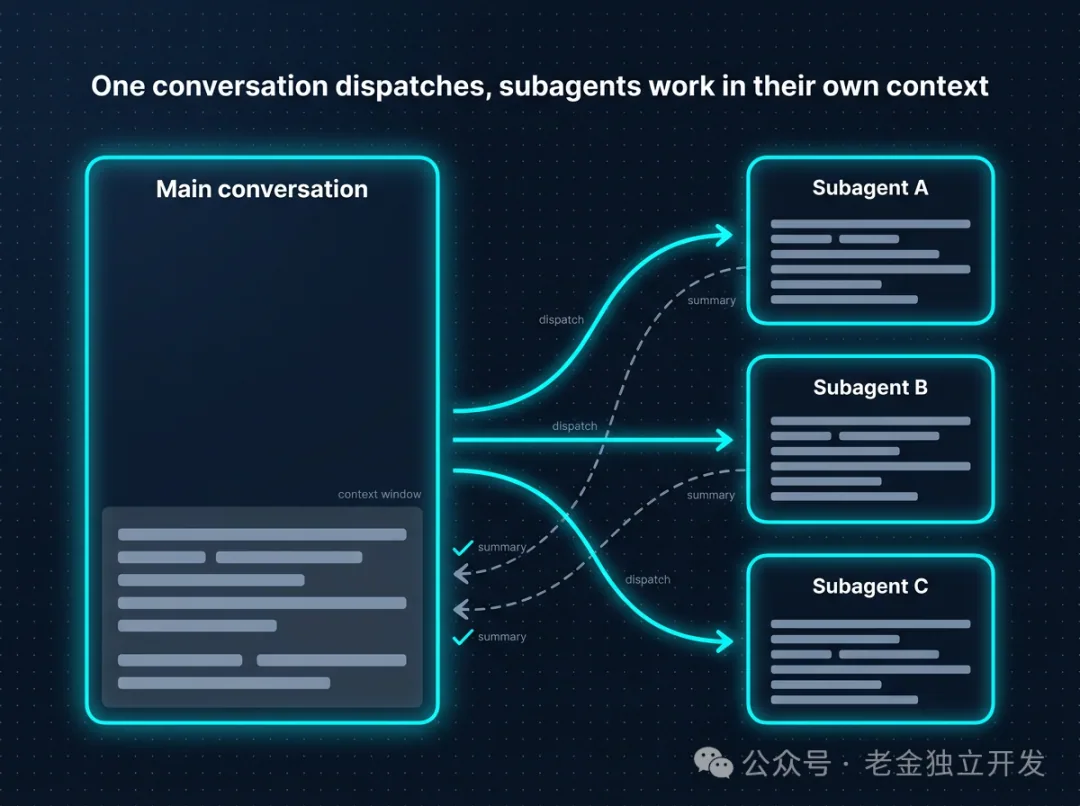
This design delivers two-way benefits.
First, the main dialog's context stays clean. A Subagent can process 50 files on its own, and only a single sentence reaches the main dialog: "This module uses JWT authentication, with validation logic in middleware/auth.ts."
Second, tasks can run in parallel. Dispatch three Subagents simultaneously to investigate authentication, database, and API layers — all three workstreams proceed concurrently without interfering with each other.
Three Subagents Built In
No special configuration needed. Claude Code ships with three Subagents out of the box:
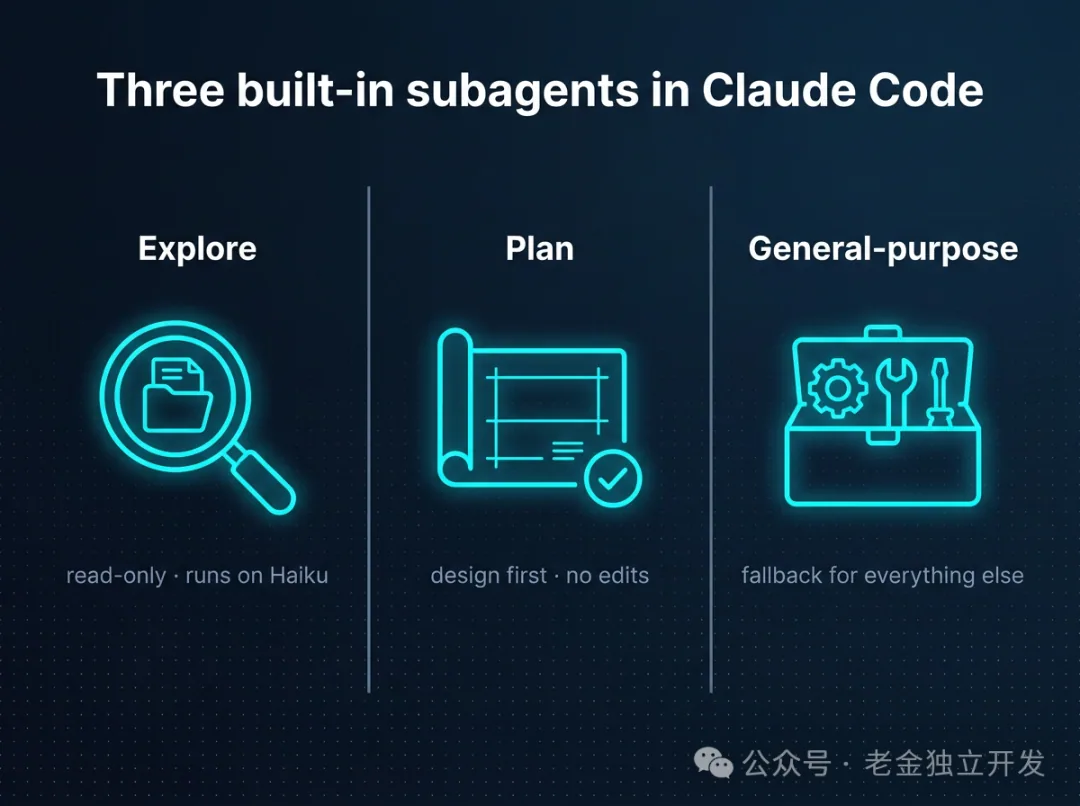
Explore — A read-only search expert. Runs on the Haiku model by default (cheap and fast). When you say "look at how X is implemented in this project," Claude automatically delegates the "read lots of files but don't write anything" task to this Subagent.
Plan — Creates architectural proposals before any work begins. Plans only — no execution. Gets your approval before anything is carried out.
General-purpose — A flexible model with no specific specialty, handling whatever comes its way.
What many people don't realize: when you tell Claude to "investigate" or "understand" something, it's often already using Explore behind the scenes. It just doesn't announce it.
Building Your Own Subagent
A Subagent is simply a Markdown file with a YAML header — no special magic required.
The easiest approach is to type /agents inside Claude Code and follow the guided setup. You can also create the file manually and place it in .claude/agents/ (project-level) or ~/.claude/agents/ (global-level).
Here's an example of a code review Subagent:
---
name: code-reviewer
description: A code review specialist. Automatically used right after writing or modifying code.
tools: Read, Grep, Glob, Bash
model: inherit
---

You are a senior code reviewer. When invoked:
1. Run git diff to review recent changes
2. Focus only on changed files
3. Prioritize feedback: critical issues → warnings → suggestions

Checklist:
- Are names clear?
- Any duplication?
- Is error handling sufficient?
- Are any secrets exposed?
- Is test coverage adequate?
Let me highlight a few key fields.
description is the most important line in the entire file. Claude uses this description to decide when to automatically delegate a task. Write "code assistant" and Claude has no idea when to use it. Write "automatically used right after writing or modifying code" — with the trigger scenario and the word "automatically" — and Claude will actually call it. How you write this line determines whether your Subagent becomes a useful tool or just decoration.
tools is a permission gate. For read-only tasks, grant only Read, Grep, Glob — leave out Edit, Write. This isn't just about simplicity; it's a safety fence preventing the Subagent from making changes beyond its scope.
model can be tiered strategically. Use Haiku for cheap exploration tasks, Sonnet or Opus for deep reviews. Pay for what you need, and don't waste expensive model calls on lightweight work.
How to Invoke Them
There are three ways to call a Subagent, each suited to different situations.
Natural language instruction: "Use code-reviewer to look at the auth module." This is conversational, but Claude might choose a different Subagent if it thinks something else fits better.
@code-reviewer to check recent changes. When you use the @ prefix, the specified Subagent is guaranteed to be used — no ambiguity.
claude --agent code-reviewer locks the entire session to that Subagent. Ideal when you want to focus on a single type of work.
Three Scenarios That Come Up All the Time
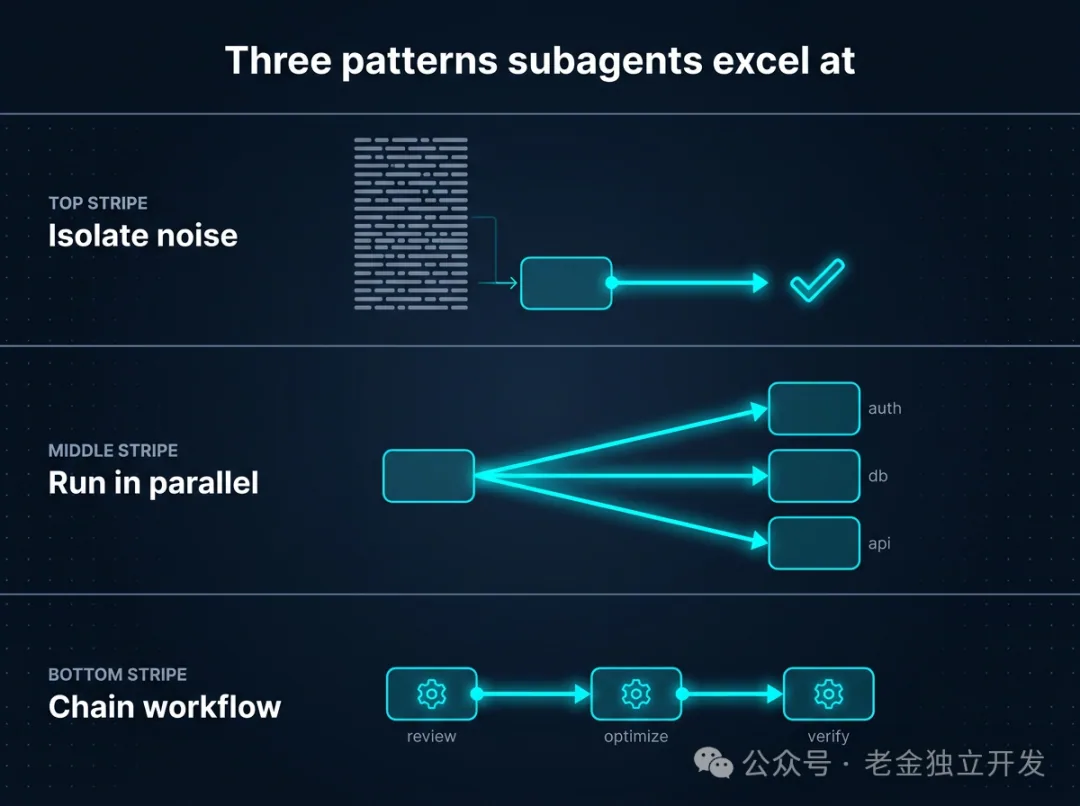
High-volume output operations like running tests or processing logs. Running npm test produces thousands of lines of output — flooding the main dialog with that creates chaos. Delegate it: "Run the test suite and report only failed tests and errors." The Subagent handles all the noise and sends back only the signal.
Parallel investigation. "Use three independent Subagents to investigate authentication, database, and API modules simultaneously." This is dramatically faster than sequential investigation, and the details from each module stay cleanly separated.
Chained workflows. "Use code-reviewer to find performance issues, then use optimizer to fix them." You can feed one Subagent's output directly into the next as input — no need to manually relay conclusions.
Don't Confuse Subagents with Skills
These two concepts are the most commonly confused features in Claude Code. Here's a quick comparison:
| Skill | Subagent | |
|---|---|---|
| What it is | A reusable instruction package | A worker with its own independent context |
| Execution environment | Inside the main dialog's context | Its own separate context window |
| When to use | You want to reuse a process within the main dialog | You need context isolation, parallel execution, or permission control |
The rule of thumb: if you need isolation, use a Subagent. If you need reuse, use a Skill.
Two Common Pitfalls
Subagents can't spawn other Subagents. Recursive delegation isn't supported. If you need nested workflows, write the process as a Skill or manually chain multiple Subagents from the main dialog.
An overly vague description is just as bad as no description at all. This is the most common beginner mistake. A description like "general purpose helper" means Claude will never invoke it on its own — it simply can't figure out when it should. The more specific, the better. For example: "automatically reviews code before PR submission and is triggered automatically" — directly stating the trigger scenario.
Advanced: Giving Your Subagent a Memory
Add these lines to the YAML header:
memory:
  scope: project
This tells the Subagent to record project patterns, bugs it encountered, and architectural conventions each time it runs. The next time it's called, it already "knows" the project.
Add this line to the body:
After completing the task, save what you learned to memory.
Over time, this Subagent transforms into a seasoned team member — review quality improves because it knows where problems have occurred in the past.
Wrapping Up
Let's return to the context window problem from the beginning. Now, when you face that situation, you delegate the "code reading" step to Explore. Only the conclusion reaches the main dialog: "The issue is in middleware/auth.ts — empty headers aren't being handled during token parsing." All that's left is to apply the fix in the right place.
The core value of Subagents comes down to three things: protecting the main dialog's context, enabling parallel execution, and controlling permissions.
You don't need to overthink it at the start. Begin with the simplest code review Subagent and have it run automatically on every commit. Once you're comfortable, the next idea will come naturally — "this task would be better handled by a dedicated worker too."
Editor's Take
Using Claude Code's Subagent, I realized 'cognitive splitting' is even more effective than saving context window. Maintaining the big picture in the main thread while delegating detailed work to sub-threads — this pattern mirrors effective human team collaboration.
Loading...