How to Use DeepSeek, GLM, and Kimi Models with Codex
If you try to directly plug a third-party API key from services like DeepSeek, GLM, or Kimi into Codex, it likely won't work as expected. The issue isn't with your key or account; it's a protocol mismatch that prevents proper communication.
The problem lies in the differing API specifications. The current Codex CLI/App in API Key mode primarily uses the OpenAI Responses API, while many third-party models offer an OpenAI-compatible Chat Completions API. These two protocols differ in message structure, streaming responses, reasoning fields, and tool call expressions, so it's not as simple as swapping a Base URL and pasting a key.
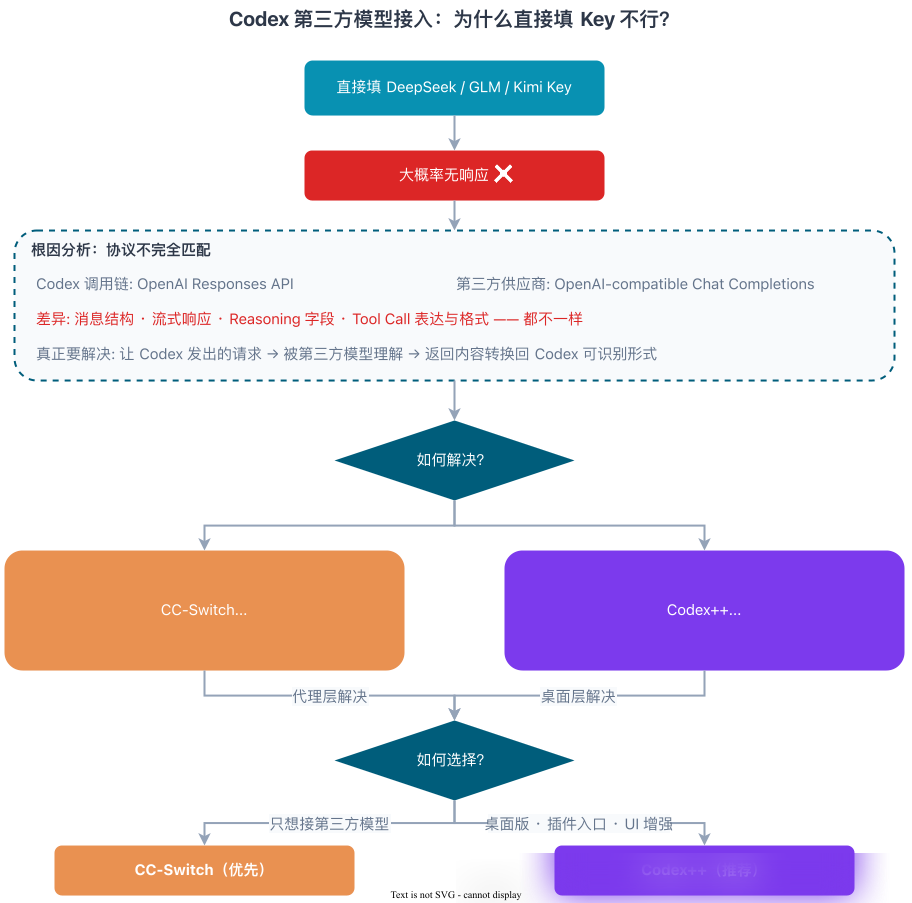
The core challenge isn't just entering an API key; it's making Codex's requests understandable to the third-party model and then converting the model's responses back into a format Codex can process.
Currently, two common solutions exist:
- CC-Switch: Uses a local proxy for protocol conversion.
- Codex++: Focuses on enhancing the Codex desktop client and injecting configurations.
Both enable third-party model connections, but they solve the problem at different layers: CC-Switch operates at the proxy level, transforming protocols, while Codex++ enhances the Codex desktop UI and configuration layer.
For straightforward third-party model integration, CC-Switch is the recommended starting point. If you primarily use the Codex desktop version and desire plugin access and UI enhancements, then consider Codex++.
1. The CC-Switch Approach: A Low-Disruption Configuration Solution
1.1 What is CC-Switch?
CC-Switch functions as a configuration hub and local routing proxy for multiple AI coding tools. Originally built for Claude Code, it has expanded to support Codex, Gemini CLI, OpenCode, OpenClaw, and others. It's a well-crafted open-source project that has gained significant traction, with its GitHub stars approaching 90k.
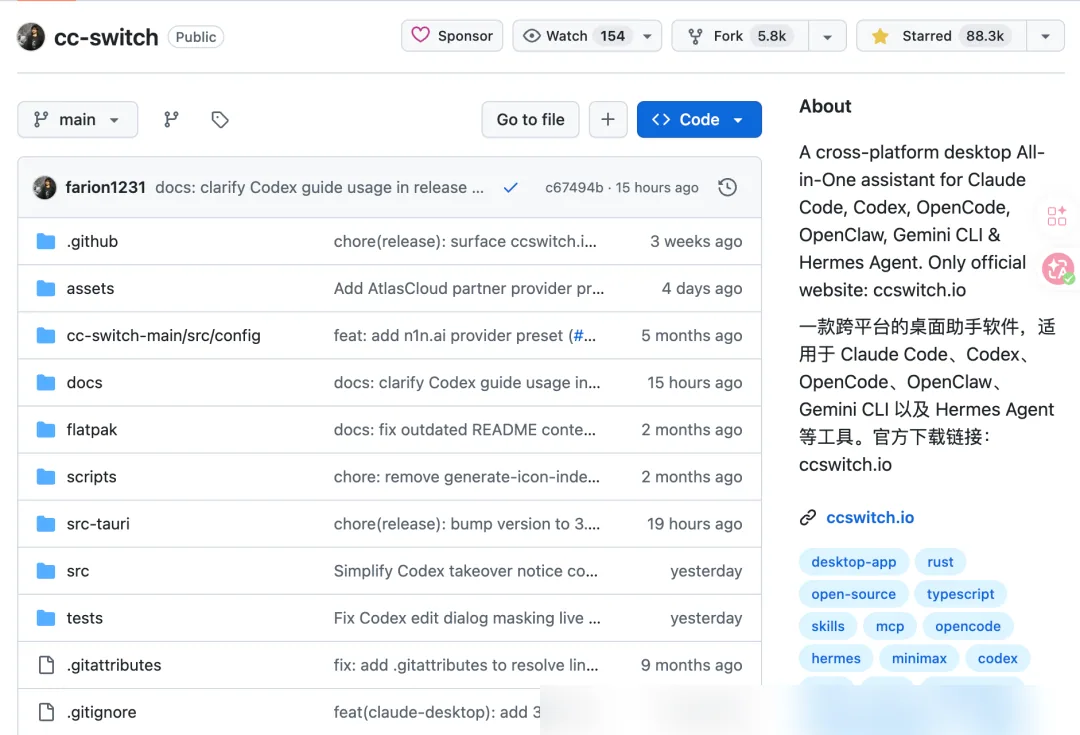
In the context of Codex, CC-Switch performs two main tasks:
- Configuration Management: Unifies configurations for different coding tools, supporting one-click preset switching, template imports, and provider changes.
- Local Proxy: Starts an HTTP service on your machine to convert Codex requests via protocol translation and route them to third-party models.
The key advantage is that it requires no modification to Codex itself; it only alters configuration and runs a proxy.
1.2 Installation and Configuration
Before setting up, ensure Codex is running in API Key/local configuration mode, not the ChatGPT login mode. Mixing modes can lead to unclear request paths and confusing errors. Also, run Codex at least once to initialize its configuration file for subsequent routing setup.
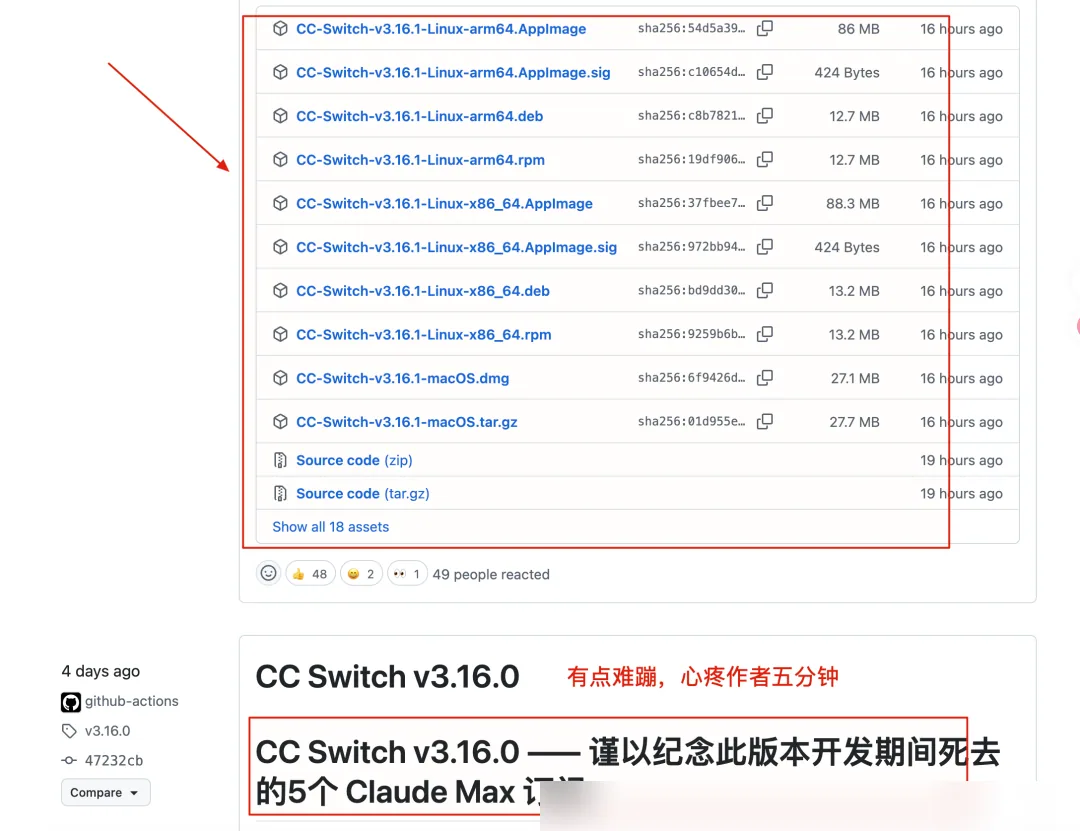
- Visit the CC-Switch GitHub repository, download, and install the package.
- Launch CC-Switch, click the
+in the top-right corner to add a provider (using DeepSeek as an example).
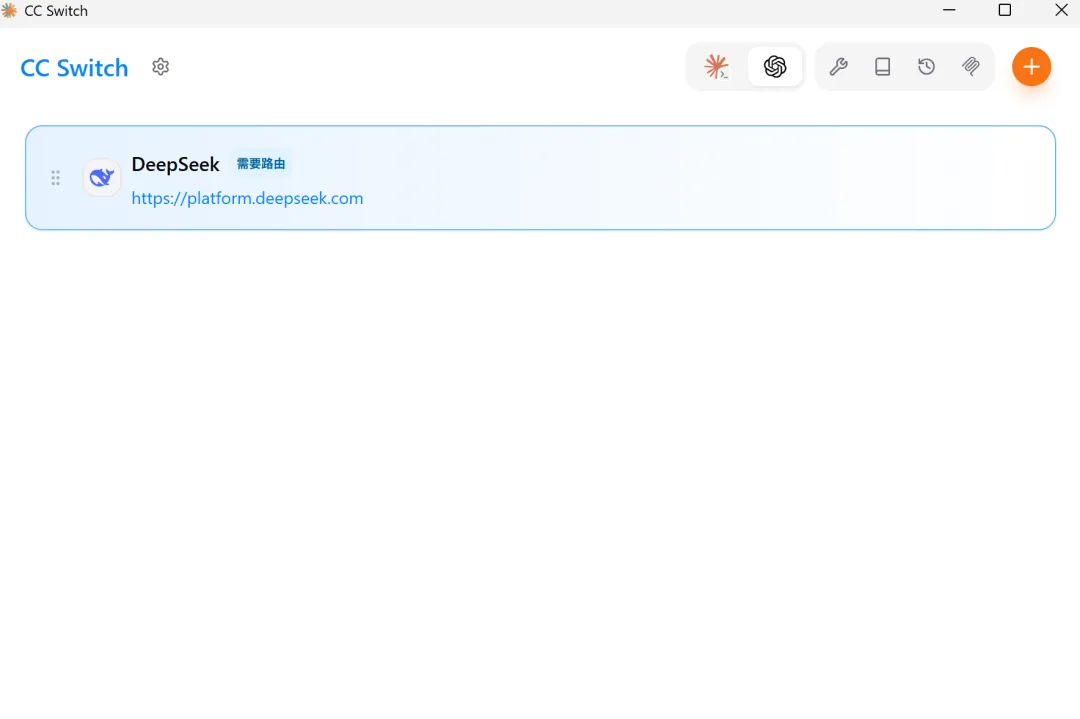 3. Typically, you only need to enter the API Key. If local routing is required, ensure
 Needs Local Routing is enabled (usually on by default).
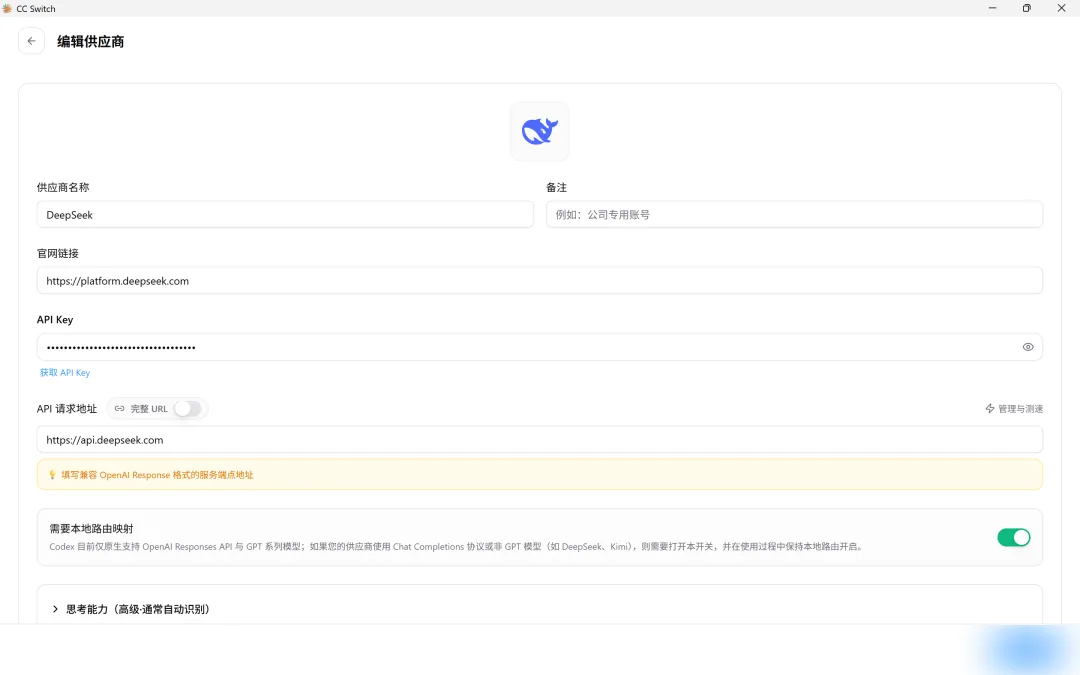
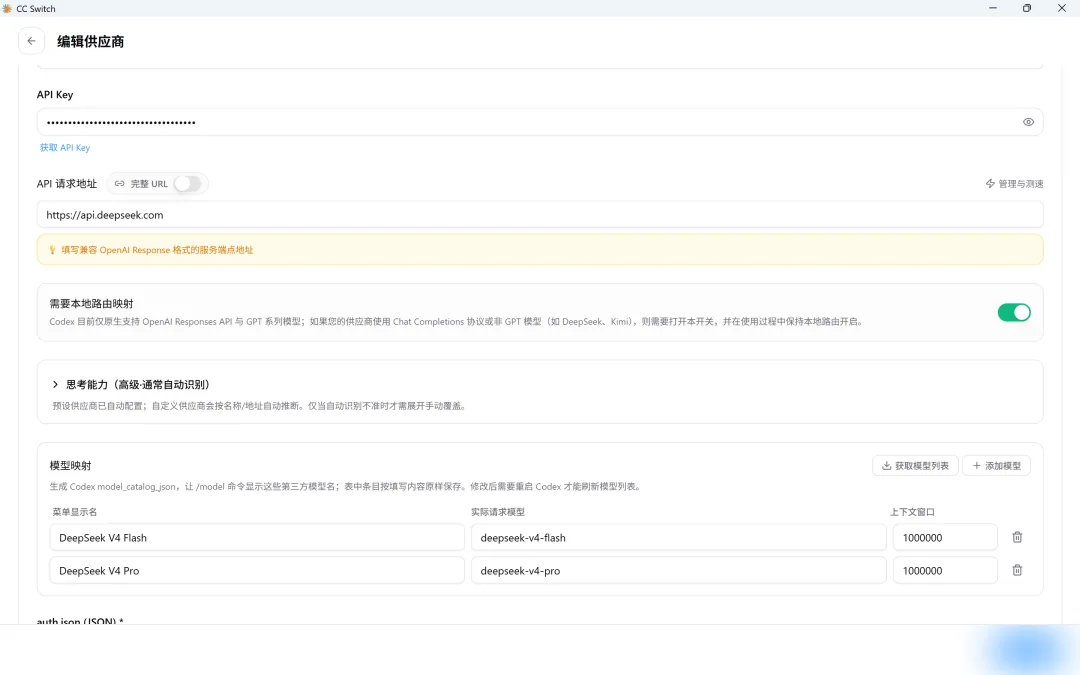 4. Return to the main page, click the gear icon in the top-left to enter settings, and enable "Routing". Turn on the local routing switch. The total request count below (
0) can later help confirm if Codex traffic is flowing through CC-Switch.
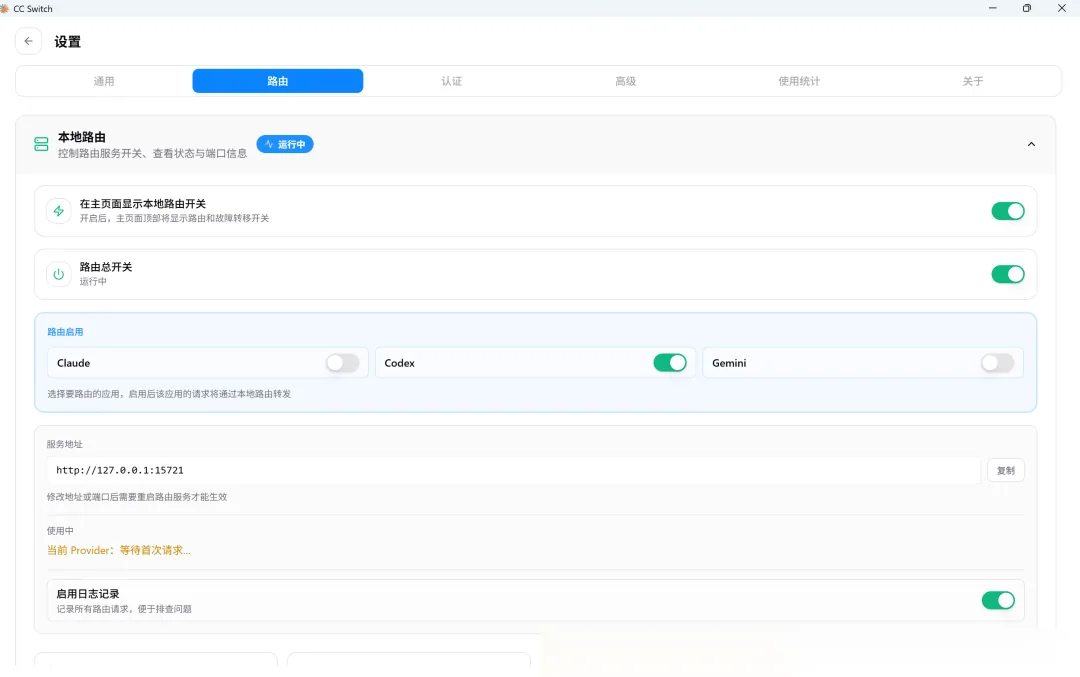
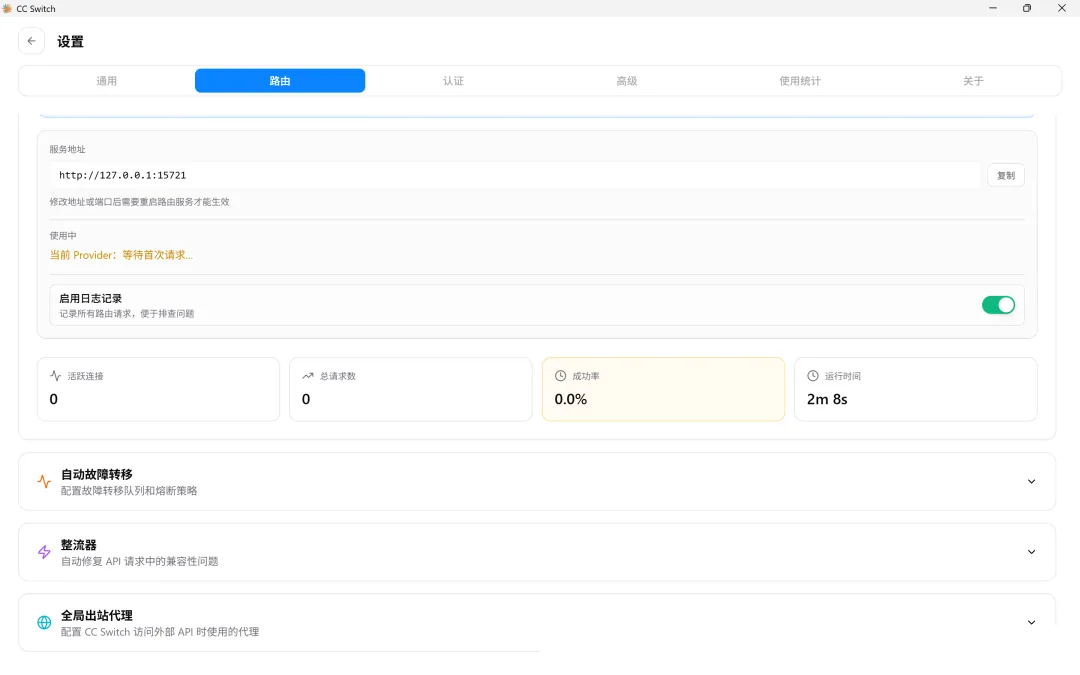 5. Restart Codex, send a test message, and verify you get a normal response.
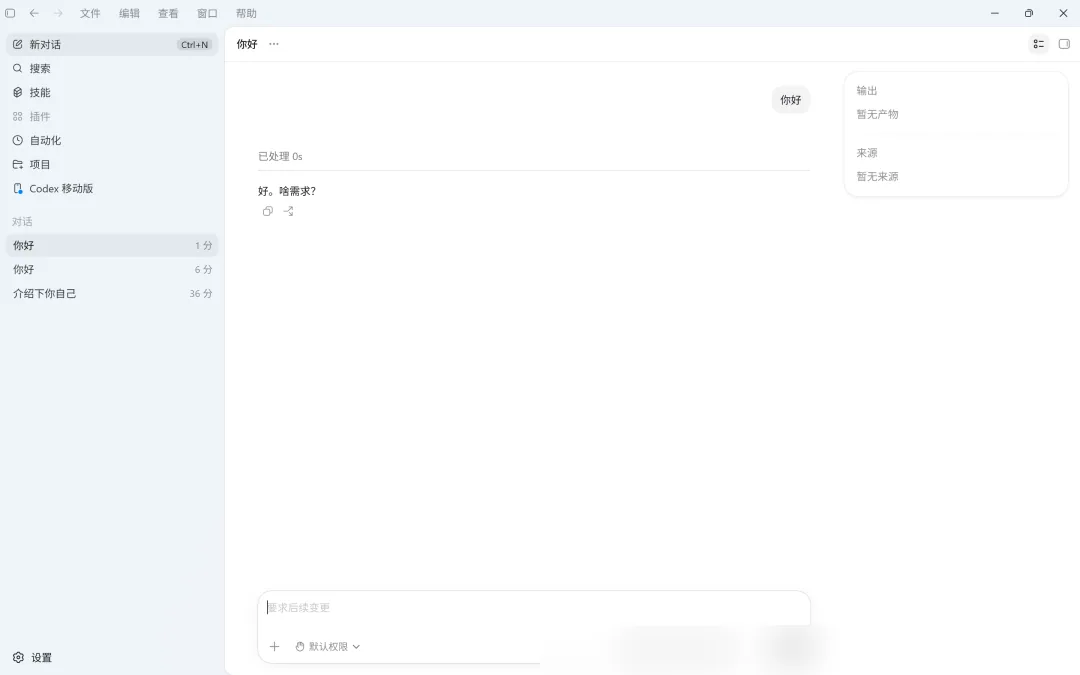 6. Check CC-Switch's routing settings. If you see request logs, the configuration is active.
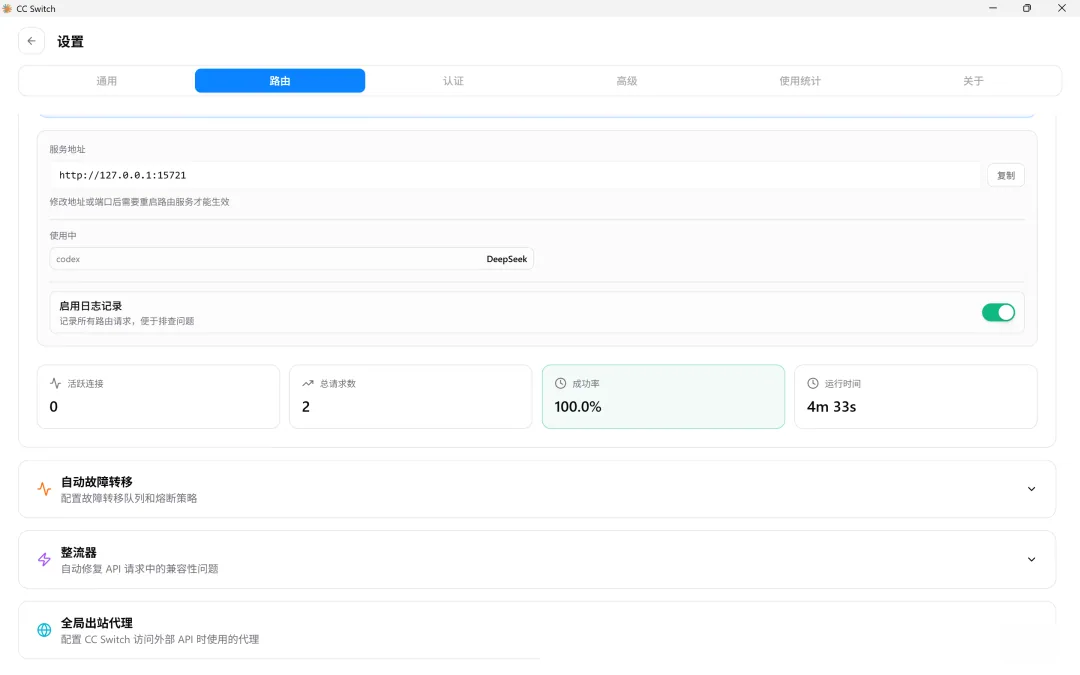
The CC-Switch setup is now complete.
2. The Codex++ Approach: A Deeper Enhancement Solution
2.1 What is Codex++?
Codex++ is not a universal protocol translation proxy; it's more of an external enhancement launcher for the Codex desktop client.
Taking BigPizzaV3/CodexPlusPlus as an example, it doesn't modify the original Codex App files. Instead, it launches Codex via an external launcher and uses the Chromium DevTools Protocol (CDP) to inject enhancement scripts into the Codex rendering process at runtime. Provider configurations are written to ~/.codex/config.toml by a separate management tool.
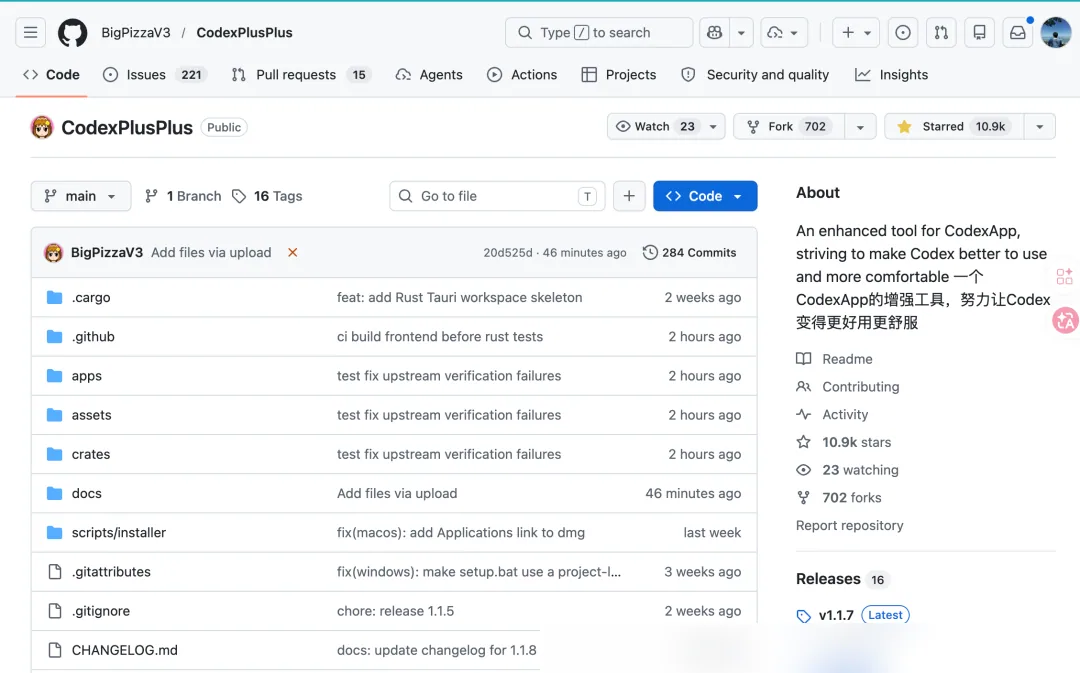
Its focus differs from CC-Switch:
- CC-Switch primarily solves request forwarding and protocol conversion.
- Codex++ is more concerned with desktop enhancements, configuration injection, and plugin entry points.
Note: There is another independent project, b-nnett/codex-plusplus, which modifies app.asar to inject a loader—a completely different architecture from the BigPizzaV3 version discussed here. All references to Codex++ below refer to the BigPizzaV3 version.
2.2 Installation and Configuration
- Visit BigPizzaV3/CodexPlusPlus and download the installer for your system.
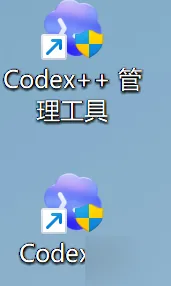
- After installation, two shortcuts appear on your desktop:
Codex++andCodex++ Manager. The Manager is for configuring providers;Codex++is used to launch Codex instead of the original icon. TheCodex++launcher must be run first to inject enhancements via CDP. Launching via the original Codex icon skips this step, and enhancements won't be active.
 3. Launch
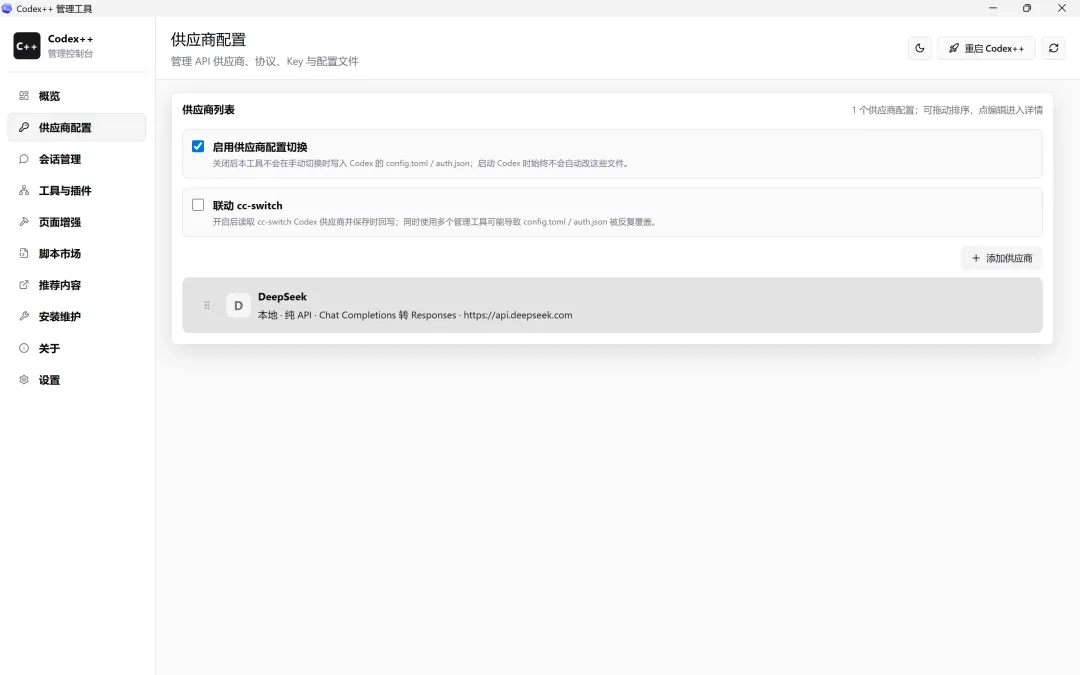
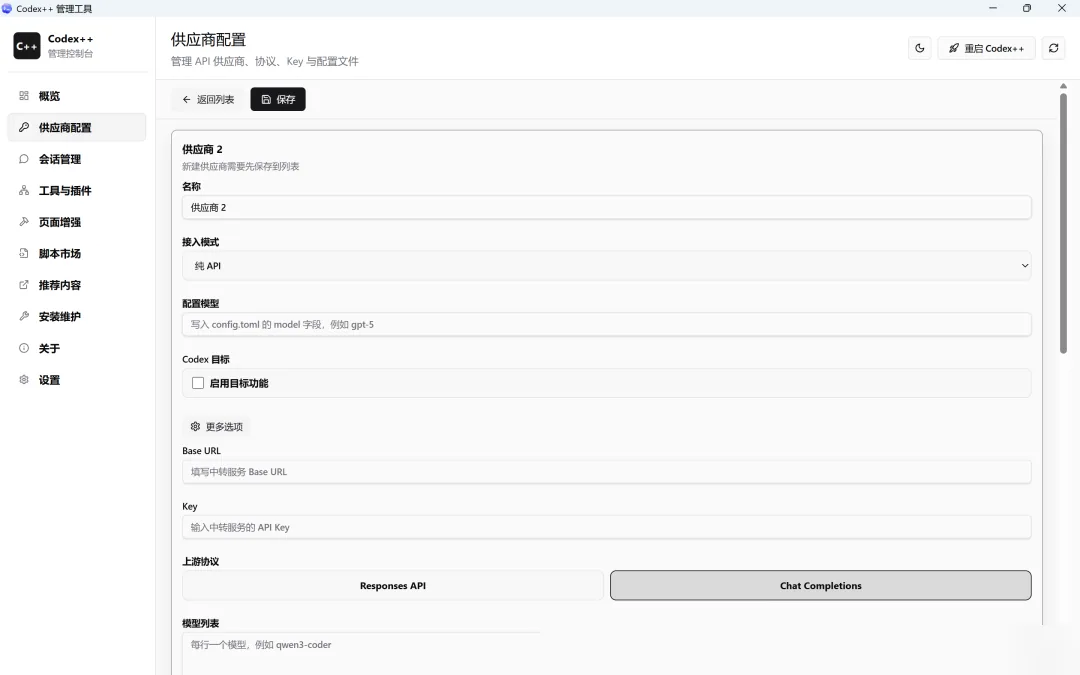
 Codex++ Manager, select Provider Configuration, and add a provider (using DeepSeek as an example):
- Connection Mode: Select "Pure API".
- Base URL: Follow the presets or prompts within Codex++ if available. The official DeepSeek OpenAI-compatible Base URL is https://api.deepseek.com. If the tool requires an OpenAI-style /v1 path, use https://api.deepseek.com/v1.
- API Key: Enter your key.
- Upstream Protocol: Select Chat Completions.
 4. After configuration, launch Codex using the
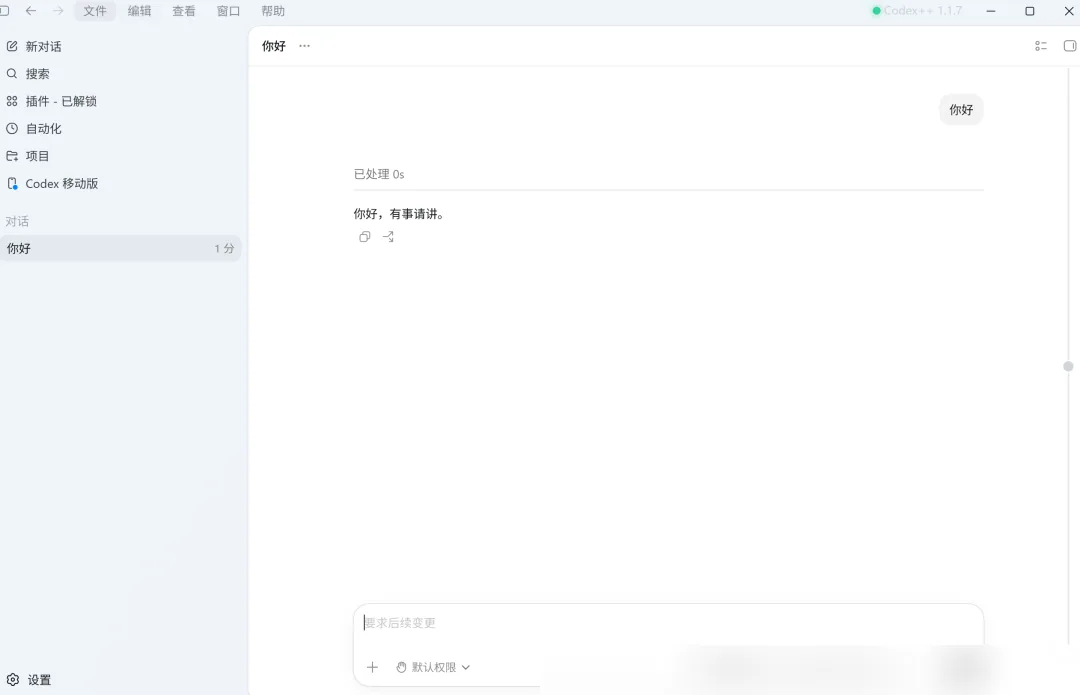
 Codex++ shortcut. If Codex is already running, quit and relaunch it, or use the restart button in the top-right corner. Opening the original Codex desktop icon directly will bypass the enhancement script, running vanilla Codex.
5. The final page effect is shown below:
2.3 What Codex++ Does
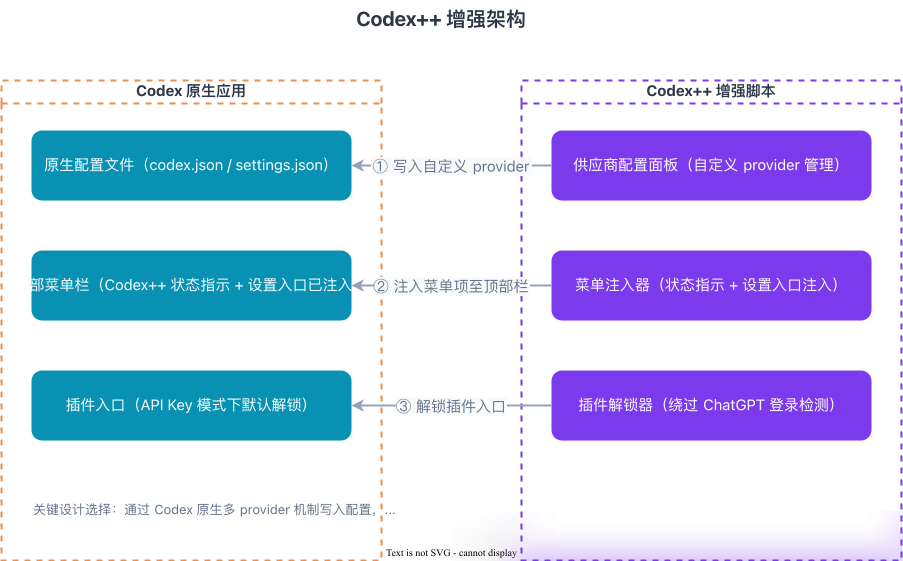
The Codex++ enhancement script performs three main functions:
First, writing third-party configurations. It doesn't intercept and rewrite all requests; instead, it writes custom providers into Codex's native configuration file (e.g., ~/.codex/config.toml), allowing Codex itself to access third-party services using that provider. Essentially, it "sets up the route" for Codex rather than hijacking requests at the network layer.
Second, adding entry points to the Codex App. When you launch Codex via Codex++, the injected script adds status and settings entries for Codex++ in the top menu bar. The actual provider addition and configuration switching still happen in the separate "Codex++ Manager" tool, not directly within the Codex window.
Third, supplementing desktop enhancement capabilities. For example, in API Key mode, the native Codex plugin entry might require a ChatGPT login; Codex++ unlocks this entry and adds features like session deletion, Markdown export, timeline, and provider synchronization.
3. The Integration Principle: What is Codex Actually Connecting To?
Despite their differences, both approaches tackle the same core bottleneck: whether the third-party service can properly handle Codex's model requests.
In API Key mode, Codex generally operates like this:
User Input
 -> Codex Agent Orchestrates Task
 -> Reads ~/.codex/config.toml
 -> Finds Corresponding Provider via model_provider
 -> Retrieves base_url, API Key, wire_api, etc.
 -> Sends Request to Model Service
 -> Model Returns Response
 -> Codex Parses Response
 -> Continues Actions like Tool Calls, File Edits, Command Execution
The critical configuration items are:
model_provider: Specifies which model provider is active.base_url: Determines where the request is sent (e.g., OpenAI, a third-party proxy, a local server, or an internal model gateway).env_key: Specifies the environment variable from which to read the API Key, avoiding hardcoding it in the config file.wire_api: Defines the protocol Codex uses to communicate with the model service (e.g.,responsesorchat).
The wire_api setting is particularly crucial. A standard chat interface that can return a text response doesn't necessarily support Codex's Agent workflow. Codex doesn't just send a question and display an answer; it must parse streaming responses, tool calls, reasoning, status fields, and then continue with file reading, code editing, and command execution.
Therefore, successful integration depends not just on whether a model is "OpenAI-compatible," but specifically whether it supports the Chat Completions protocol and can fully handle the Responses API pipeline that Codex currently utilizes.
3.1 Why Simply Changing the Base URL Isn't Enough
Codex currently favors the OpenAI Responses API, while many third-party models provide the Chat Completions API. These are distinct protocols.
The Responses API is designed for Agent scenarios, involving more state and event structures. The Chat Completions API is more like a traditional conversational interface, centered on a messages list and model replies. A regular chat tool only needs to send messages, but Codex must also handle tool calls, streaming events, context, reasoning, and task states.
Thus, the real challenge in integrating third-party models isn't that "the request can't be sent," but rather whether "the requests and responses can be correctly understood by both sides."
3.2 CC-Switch's Principle: Protocol Conversion at the Proxy Layer
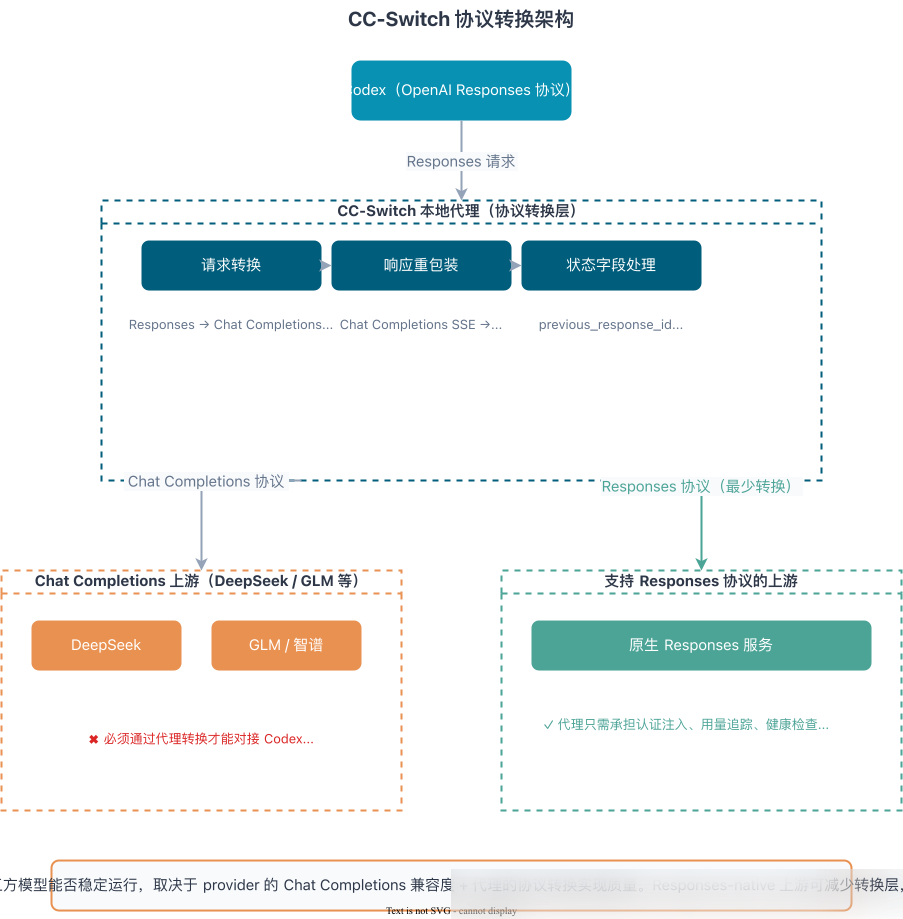
CC-Switch's local proxy handles protocol conversion:
- It transforms Responses requests from Codex into Chat Completions format before forwarding them upstream.
- It re-packages the upstream SSE streaming responses back into the Responses format for Codex.
- It manages reasoning content, tool calls,
previous_response_id, and other state fields.
Because of this conversion layer, the stability of third-party model integration depends not only on the model itself but also on the provider's compatibility and the proxy implementation.
If the upstream provider natively supports the Responses API, the proxy can skip the Chat Completions conversion layer, mainly handling authentication injection, usage tracking, and health checks.
3.3 Codex++'s Principle: Enhancement at the Desktop Layer
Codex++ focuses on Codex App desktop enhancement + provider configuration writing/syncing. Unlike CC-Switch, which funnels all requests through a local proxy for protocol conversion, Codex++ uses a launcher to start Codex and injects enhancement scripts via CDP. This equips the Codex App with additional menus, configuration entries, plugin access, and provider switching capabilities.
In simple terms: CC-Switch primarily solves "how to route requests and convert protocols"; Codex++ primarily solves "how to enhance the Codex desktop client and make third-party provider configuration more convenient to manage and switch."
4. How to Choose: CC-Switch or Codex++?
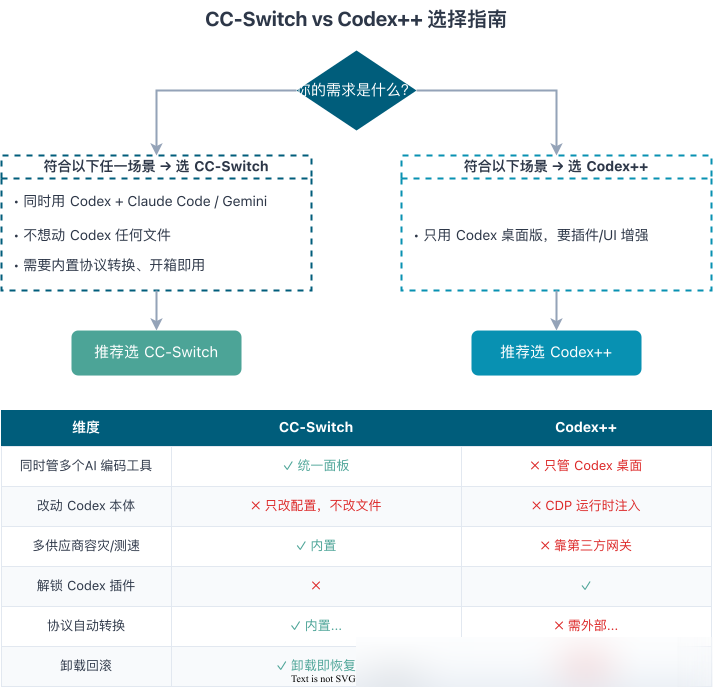
Bottom line: For most users, CC-Switch is sufficient and is the recommended default path.
4.1 Choosing Based on Needs
- Use Codex CLI and also run Claude Code / Gemini CLI: Choose CC-Switch.
- Use only the Codex desktop version and want plugin access & UI enhancements: Choose Codex++.
- Don't want to modify any Codex installation files: Prioritize CC-Switch.
- Want out-of-the-box protocol conversion and local routing: Prioritize CC-Switch.
- Interested in tinkering with desktop enhancements, plugin entries, script injection: Consider Codex++.
4.2 Feature Compatibility
After connecting a third-party model, don't assume all Codex features will work perfectly as replacements. A realistic assessment:
Unusable or Very Difficult to Replicate:
- Image Gen: Relies on OpenAI's specific image generation capability, which text-based third-party models cannot directly replace.
- Computer Use: Relies on the Responses API's built-in
computer_useaction type, local runtime, and screenshot feedback loop. The Chat Completions protocol and standard third-party models typically cannot provide equivalent capabilities, and the protocol conversion layer cannot easily bridge this gap.
Degraded but Usable:
- Generic Skills/Plugins: Partially functional with Codex++ page enhancements; stability varies by version.
- Tool Calls: Basic code editing, file I/O, and command execution usually work, but complex tool calls or long-running tasks may still encounter formatting and compatibility issues.
Generally Normal:
- Code writing
- Debugging and refactoring
- File reading/writing
- Project management
- Multi-turn dialogue
- Task planning
4.3 A More Practical Usage Strategy
- Lightweight code Q&A, text tasks, simple scripts: Models like DeepSeek offer clear cost advantages.
- Complex engineering projects: Use a stronger model like GPT for initial planning, then delegate simpler sub-tasks to third-party models.
- If your GPT Plus/Pro quota is sufficient: The native experience remains the most stable and may not require additional setup.
References [1] CC-Switch GitHub Repository: https://github.com/farion1231/cc-switch [2] BigPizzaV3/CodexPlusPlus: https://github.com/BigPizzaV3/CodexPlusPlus [3] b-nnett/codex-plusplus: https://github.com/b-nnett/codex-plusplus [4] BigPizzaV3/CodexPlusPlus: https://github.com/BigPizzaV3/CodexPlusPlus
Editor's Take
There's high demand for connecting third-party models to Codex, and this article's approach is practical. But needing protocol conversion reveals ecosystem fragmentation. Standardization would eliminate this friction, but we're still in a transitional period.
Loading...